After removing photo metadata, what still reveals an address?
A synthetic JPEG with GPS, camera, date, XMP and a visible address: inspect the actual browser download, field by field, alongside the original.
Self-created synthetic source · processed in the live site tool · source and download available
GPS was removed; the visible address remained
We processed one JPEG containing synthetic records through this site's metadata remover and inspected the actual download. Its EXIF location, camera and capture time, XMP and JPEG comment were absent. The address drawn into the pixels, ‘123 EXAMPLE ROAD’, and the address in the download name remained. Removing metadata alone did not make the image anonymous.
What did we put in the synthetic source?
JUUD Apps drew this image with pixel lettering and flat colours; no person or location was photographed. The address, camera, creator and date are test records. GPS 0°N, 0°E is an inserted fixture value, not a camera-recorded location. We wrote latitude, longitude, capture time, camera and orientation into actual TIFF IFD fields in EXIF. The same fictional address also appears separately in XMP, a JPEG comment, visible lettering and the file name.
The stored pixels are 500 × 800; applying EXIF orientation 6 displays them at 800 × 500. We also checked whether the export retained the intended orientation. The source contains no ICC profile, thumbnail or IPTC record, so this experiment does not test their removal or colour management.
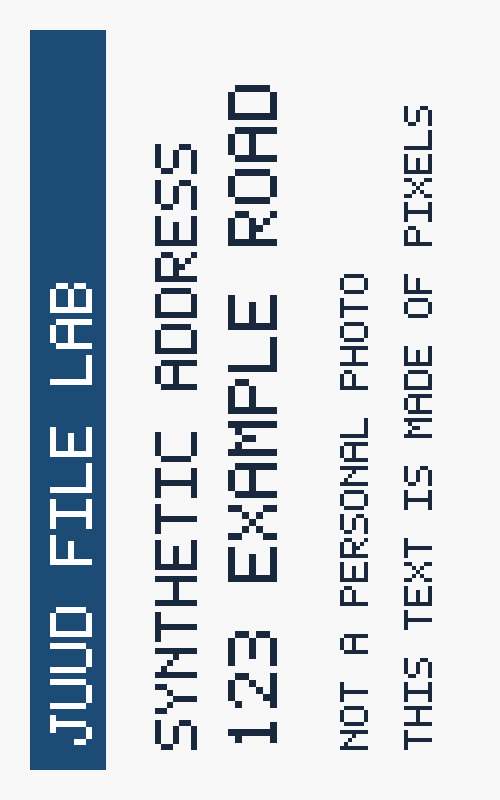
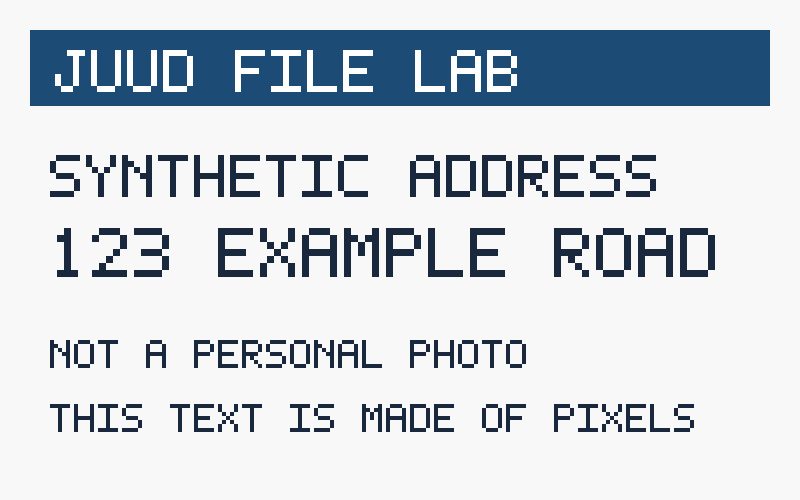
What the original and output contain
| Item | Source | Output |
|---|---|---|
| GPS latitude / longitude | 0° 0′ 0″ N / 0° 0′ 0″ E | Absent — no segment containing those fields |
| Camera model | JUUD SYNTHETIC CAMERA | Absent — no segment containing those fields |
| Capture time (DateTimeOriginal) | 2026:10:04 09:30:00 | Absent — no segment containing those fields |
| XMP description / creator | SYNTHETIC ADDRESS: 123 EXAMPLE ROAD / JUUD_SYNTHETIC_AUTHOR | Absent — no segment containing those fields |
| JPEG comment (COM) | SYNTHETIC COMMENT - 123 EXAMPLE ROAD | Absent — no segment containing those fields |
| EXIF orientation | 6 | Absent — orientation applied to pixels |
| ICC profile segment | Absent | New APP2 segment present — 470-byte payload |
| Address drawn in the image | 123 EXAMPLE ROAD | Remains — checked in the output image |
| Download name | synthetic-123-example-road.jpg | synthetic-123-example-road.jpg |
The source was 68,643 bytes and the output 37,317 bytes. The source JPEG was generated at quality 94 with 4:4:4 sampling; we used the tool's default quality 82. The tool decodes and re-encodes pixels instead of deleting metadata bytes in place, so the size difference is not a measurement of metadata size.
Stored dimensions changed from 500 × 800 to 800 × 500 because the EXIF orientation was applied to the pixels; the displayed image was not enlarged. The output introduced JFIF format information and an APP2 segment marked ICC_PROFILE (470-byte payload), neither present in the source. We did not verify the profile type or colour accuracy. Removal of the inserted personal-data fields is therefore different from a claim of zero metadata.
Check three places before sharing
- Embedded records: inspect the saved copy after removing metadata. The small inspector published here verifies this JPEG fixture and its EXIF fields; it does not scan every format or discover all hidden data.
- Visible content: addresses, faces, document numbers and information on screens remain in the pixels. This tool does not recognise text or obscure faces. If you edit sensitive areas separately, reopen the final file and check it at normal size and zoomed in.
- File name: the export name may still include an address or a person's name. Rename it neutrally before sharing. We archive this output as browser-output.jpg to distinguish the public evidence files; the actual name offered by the tool is recorded in the table above.
Remove metadata from a copy of your original · File handling and security
No metadata warning is not a clean-file certificate
After file selection, the tool's preflight warning checks at most the first 1 MiB (1,048,576 bytes) for signs of metadata. It does not display individual GPS or camera values or audit the entire file. For example, records after a large PNG's image data can fall outside that range. An absent warning does not establish that the original contains no private records. This limit concerns the advisory inspection; conversion decodes the image and creates a new file.
Environment and independent verification
On 4 October 2026, we selected this one source in the public Korean metadata-removal page and processed it without changing settings: default quality 82, original JPG format. Environment: Codex In-app Browser on Windows; exact browser engine version was not recorded. We publish the downloaded bytes without re-encoding them and inspected the JPEG segments and actual TIFF IFD values with a separate Node script.
- Download the source JPG, browser output JPG and inspector into one folder. SHA-256 values in measurements.json identify the exact files used in this article.
- With Node 22 or newer, run the first command below to inspect both files. Inspection reads local files with no external library or network request. Compare exif, xmp, comments and stored/display dimensions with the published JSON.
- To recreate the source, install sharp 0.35.3 and run the second command. Process that source through the site and compare the same fields. Different browsers, operating systems or encoders may produce different byte counts and hashes.
node metadata-lab.mjs inspect synthetic-123-example-road.jpg browser-output.jpg

# Optional: recreate the synthetic source
npm install sharp@0.35.3
node metadata-lab.mjs generate ./samples
Before/after inspection, environment and SHA-256 JSONSource generator and inspection code
The inspector reads segments before the first JPEG image scan and the TIFF tags used by this fixture. It does not cover the entire EXIF standard, data after a scan, steganography, PNG, WebP or HEIC. This is one JPG in one environment, not a guarantee for every phone photograph. Cross-check sensitive exports independently and keep the original safely.
Found an error? Include the file name, the values you compared and your environment. Do not attach personal documents. Contact us for a correction